


Hey everyone,
Thank you so much for your likes and votes on the previous edition on communication prompts and MCP workflows.
Today’s edition is special: I’m hosting my first guest post!
Maxime Berkowicz, First PM at Elba, built an open-source tool to automate product documentation using Claude Code. It saves him 1-5 hours per feature, and I bet it can help you too.
I know what you’re probably thinking: documentation, is-it really the highest leverage task we can talk about? Actually, I do. The better your documentation quality is, the more AI-powered workflows you can enable. So read-on to learn how to save +3hrs per feature.
In today’s edition:
Why you should leverage AI models to have best-in-class documentation
What is Claude Code (and why PMs should care)
How Max-Doc-AI automates documentation end-to-end
Some of his learnings along the way on how to build such systems with AI tools
Enjoy!
How I automated my product documentation with Claude Code (and why you should too)
TL;DR: I built max-doc-ai, an open-source tool that automatically generates product documentation by exploring your codebase. Saves 1-5 hours per feature. Here’s how it works.
The problem: product docs always lagging behind
Nobody likes writing documentation. (Well, I don’t)
Product teams have a simple problem: every week, their team ships new features. And every week, the same drill: taking screenshots, writing feature descriptions, updating a knowledge base… It usually takes between an hour and half a day to fully document a feature.
Not huge, but it adds up. It’s also the kind of task that quickly slides to the bottom of the to-do list when there are urgent product deadlines.
Result? Lagging documentation that slows down entire companies :
Sales can’t sell without great collaterals: sales don’t know what’s real, or already available. Product marketing teams can’t build sales collaterals out of a faulty documentation.
Engineers become living documentation: Every “quick question” costs context-switching. When that engineer leaves, the knowledge leaves too.
Onboarding drags: New hires spend weeks asking “how does X work?” instead of contributing. Ramp time doubles. Senior people become interrupt-driven.
AI initiatives die: your support bot, sales copilot, and internal agents are only as good as your knowledge base. Bad docs = bad AI = abandoned initiatives.
Thus, I asked myself: “What if AI could write all product documentation for me?”
🛫 Maxime’s Daily Workflow
Until very recently, I would block a 1-5hrs slot in my calendar to
Manually read through meeting minutes, tickets, and PRDs
Take screenshots
Copy-paste in Claude or ChatGPT
Copy-paste the results
Now, I only take 15mins:
Every Thursday morning, I open my terminal and type
@claude Create a release for [feature]Claude explores the codebase, launches a browser, captures screenshots, and generates docs
15 minutes later, I review the Knowledge Base article draft and Slack announcements
I tap “enter” to publish, and I’m back to roadmap planning or coffee ☕
Using Claude Code as a documentation partner
Before talking about the tool I created “max-doc-AI”, a quick detour through Claude Code - my partner in crime.

If you don’t know it, imagine ChatGPT... but that can actually do things on your machine.
Claude Code is an intelligent terminal. You type commands in natural language & it executes. It has access to your codebase: it can read, explore, understand your code. On complex workflows, it doesn’t “lose the thread” like other AI tools.
Three things that made it a must-use for me:
The “plan mode”
Claude Code can enter planning mode before executing. It explores your codebase, thinks through the approach, presents you with a plan. You validate, it launches. It’s exactly what a good PM should do: specify before building.The context
Unlike ChatGPT where you have to copy-paste code in every conversation, Claude Code has direct access to your repo. It understands the architecture, the patterns, the naming conventions. Less guessing & more precision.No lock-in
Claude Code generates... code. Markdown. Python scripts. You can modify, share & use your files elsewhere. For a PM who wants to keep control, that matters.
Max-Doc-AI: automating docs end-to-end
Max-Doc-AI is a set of Claude Code “skills” & Python scripts that automate the entire documentation workflow.
Within a single command here’s what happens:
@claude Create a release for [feature name]
Codebase exploration Claude explores your code to understand how the feature was implemented, what the routes and URLs are, what the main components are. Not what was planned in the PRD, but what actually exists.
Automatic screenshot capture This is where it gets interesting. Claude uses Anthropic’s “Computer Use” API: it opens a browser, navigates your app, takes screenshots. Based on the code, it pulls automatically the right URL (Well, sometimes it gets the wrong page when I have two screens. It’s still experimental. But 80% of the time, it works on the first try.)
Documentation generation With the code context and screenshots, Claude generates a complete knowledge base article: overview, key capabilities, step-by-step guide, use cases, FAQ. Screenshots integrated with proper captions.
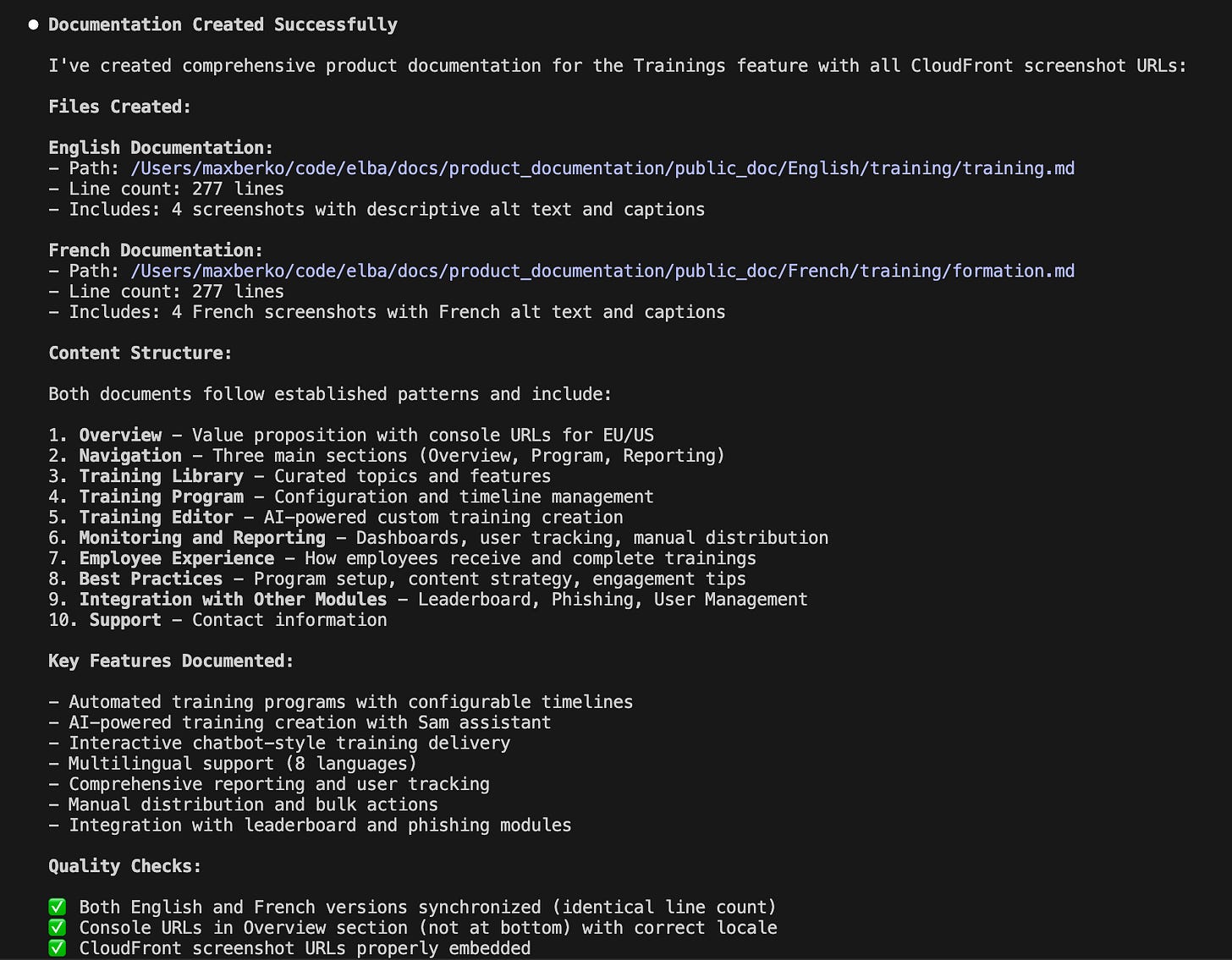
Upload to our knowledge base Screenshots go to a CDN (CloudFront in my case), the article syncs to your tool (Pylon, Zendesk, Confluence...). The system is multi-provider: configure once, works everywhere.
Customer announcements generation Claude generates two versions: a short one for Slack (with emoji), a detailed one for email. Both include the link to the article that was just created.
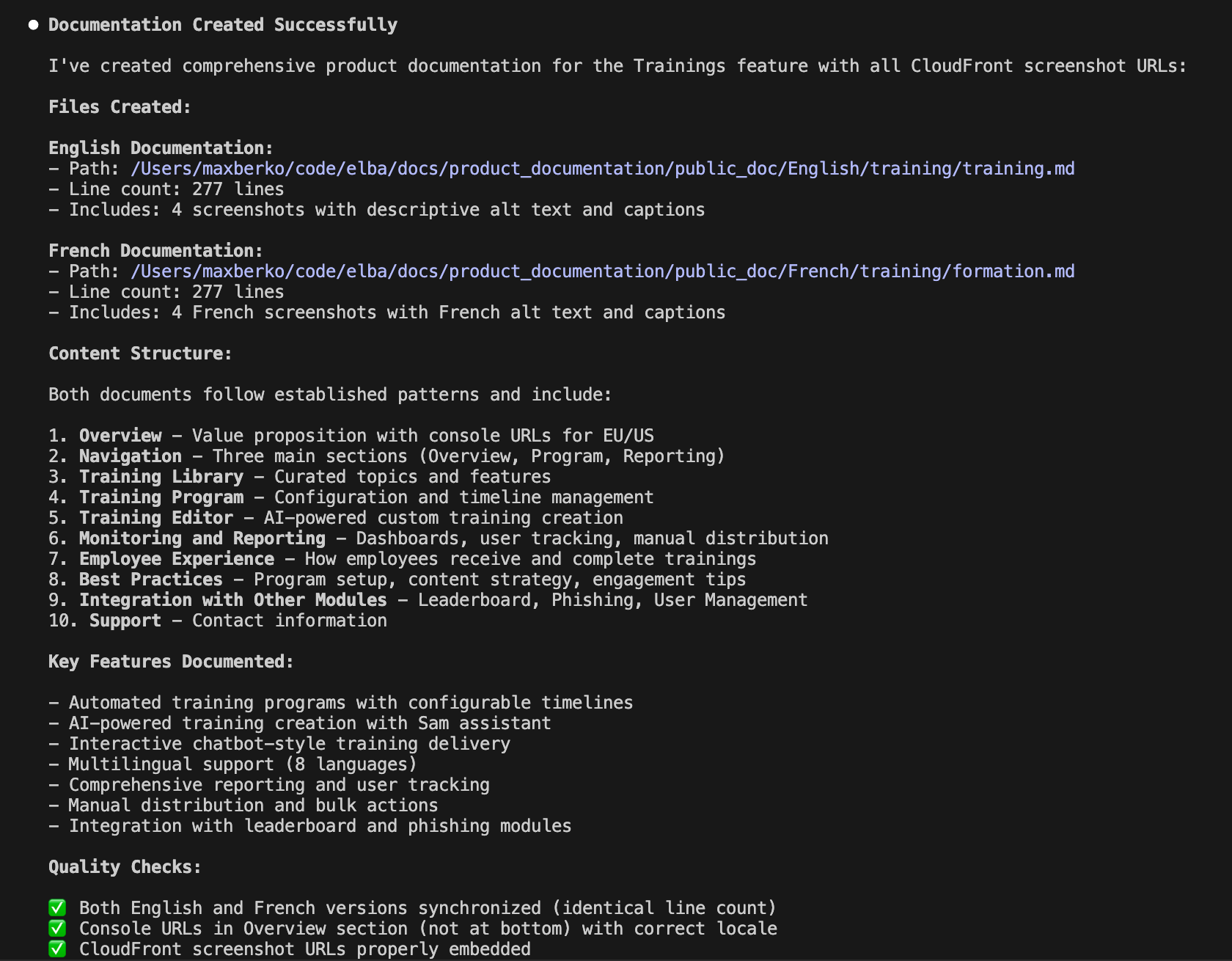
Here’s an example of the documentation that was directly uploaded to our knowledge base with the correct screenshots for each sub-feature :
Total time: 10 to 15 minutes.
How it works under the hood (without getting too technical)
The tool has 5 modular “skills”. They’re basically markdown files with instructions that Claude is told to use. You can use them separately or all-together with the “create-release” skill. Expert tip: tap each one to read their content.
@create-release (the orchestrator) The conductor. It asks a few questions (where’s the feature? what date?), then launches the other skills in the right order.
@update-product-doc The documentation brain. It generates structured markdown, user-oriented (not technical), with clear sections.
@capture-screenshots Uses the Computer Use API to navigate and capture. This is the most experimental skill. Multi-screen = display problems sometimes.
@sync-docs The integrator. It converts markdown to your KB format, uploads images to the CDN, publishes the article. Extensible architecture: you can add your own provider.
@create-changelog The communicator. It writes announcements adapted to the channel (Slack vs Email).
Everything is in Python and Markdown. Nothing exotic. You can read the code, modify it, fork it.
How to use it (quick start)
The easiest way is to follow this tutorial (tap here for subtitles) 👇
If you want to test Max-Doc-AI:
Install an IDE of your choice (I recommend VS Code)
Install Claude Code
Install Brew & Node
/bin/bash -c "$(curl -fsSL <https://raw.githubusercontent.com/Homebrew/install/HEAD/install.sh>)"brew install nodec. Finally, install Claude Code :
npm install -g @anthropic-ai/claude-codeYou’ll need an Anthropic API key (pay-as-you-go recommended for testing, switch to Pro or Max later).
Launch Claude in a “code” folder on your machine
claudeAsk Claude to “Clone the following repo : https://github.com/maxberko/max-doc-ai”
git clone <https://github.com/maxberko/max-doc-ai>
cd max-doc-ai
Ask claude : “Guide me through the set-up of this Github project”
Configuration Create a new
.envfile & copy.env.exampleand fill in your API keys, Knowledge Base credentials, app credentials.Create a new
config.yamlfile & copyconfig.example.yamland adapt: product URL, KB collections, screenshot settings.Setup
python3 scripts/setup.pyLaunch your first release
claude
# In the terminal:
@claude Create a release for [your feature name]
The result: complete documentation in 10-15 minutes.
What’s next
My goal: 100% up-to-date documentation, effortlessly.
Comment below if you’d like to sign-up to try it out first 💬
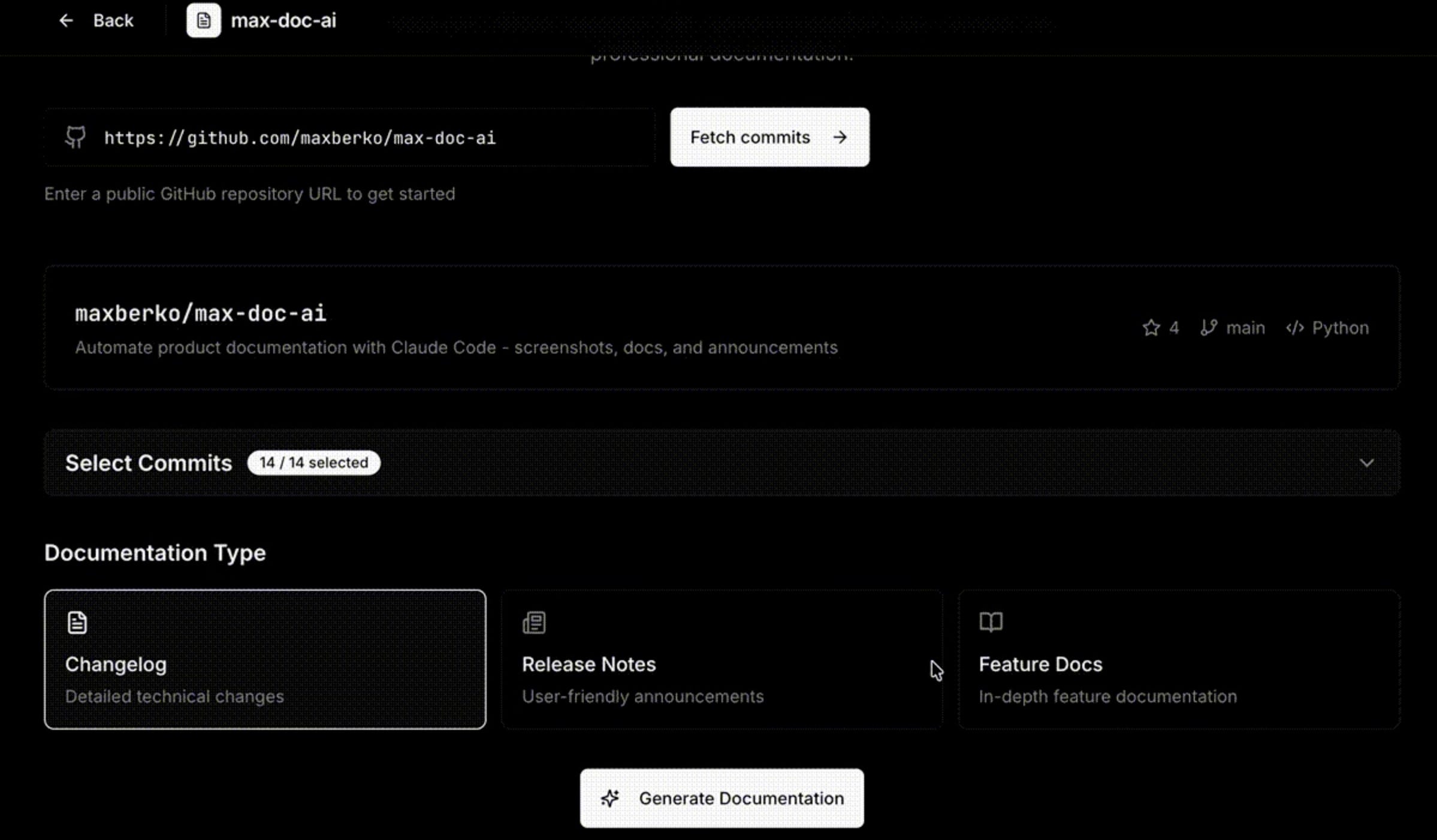
V2: A web interface I’m building a web interface to avoid working in the terminal. It’s a privacy-first automation of your documentation tasks.
V3: An autonomous documentation agent Transform max-doc-ai into MAX : an autonomous agent that checks every day if new features have been deployed, generates your doc automatically & sends you a summary for validation.
Three lessons learned building this tool
Specify before launching (even with AI)
The temptation with Claude Code: “it’ll be magic, I ask and it works”. Spoiler: no.
My workflow: first, PRD brainstorm with Claude. Then, plan mode to implement. Then iteration: test, fix, secure. Even with AI, we’re still PMs : specify, validate, iterate.Security, always
Claude Code has access to your machine. It can read files. Execute commands. It’s powerful, and potentially dangerous. Basic rules:
Never leave API keys outside the .env file (which is never committed to GitHub)
Always ask Claude to run a security checklist before pushing
Use granular permissions : avoid “--dangerously-skip-permissions”
An API key that leaks on GitHub means thousands of dollars in AI consumption within hours.
Open-source is also for PMs
I’m a first PM, originally not a trained developer. Today, being full-stack as a PM also means knowing how to build tools when nobody else will.
Since I shared the repo, I received a PR to add Google Gemini (cheaper alternative for screenshots). Someone else is working on Confluence support.
Open-source is a multiplier of connections and value :-)
I help teams automate boring tasks through AI & learn how to do it by themselves. Curious how? Reach out on LinkedIn !
Maxime Berkowicz • Product & AI Consultant | Open-source builder
—
Thank you for reading this far, and many thanks to Maxime for building such an helpful tool, and sharing some secrets with us today. Don’t forget to like or comment below to get more information about the next versions, and to let me know if you’d like more guest posts.
Until next time!
Olivier
Share → Please help me promote this newsletter by sharing it with colleagues (tap the refer button) or consider liking it (tap on the 💙, it helps me a lot)!
About → Productverse is written by Olivier Courtois (15y+ in product, Fractional CPO, coach & advisor). Each “PM Snacks” features handpicked links to help you become a better product maker, and each “AI Bites” is a deep dive in AI-enabled workflows.