

Hey everyone,
Thank you so much for your likes, shares, and votes on the first edition written by a guest 🔥. Maxime’s documentation workflow clearly resonated!
Today I’m sharing exactly how I organize myself: introducing the AI Product Workspace. It’s a small folder of markdown files that I create for each project (or client in my case), in order for AI to work with a real product context.
In today’s edition:
Why AI outputs get generic when your context lives only in your head
The exact 5-file scaffold I recommend
A prompt to create the files in one session by talking
How I keep the workspace alive with lightweight automations
Bonus: an interactive premortem prompt that helps you think deeper about what might go wrong, and actively prevent it.
Enjoy!
The AI Product Workspace (5 files to improve your agent’s quality)
Why your AI keeps forgetting
Every new chat starts from zero, so you’ve to re-explain the product, the users, the current initiative, the constraints. You forget one detail, and the output goes sideways…
Projects in ChatGPT or Claude help a bit. But they still tend to be shallow: a few instructions, a few uploads, and no real operating structure. They’ve memory but you can’t be sure if it’s gonna be used, nor how.
The simplest fix I can recommend:
Keep your core product knowledge in a small folder on your machine. I call it the AI Product Workspace.
Then start Claude Cowork, Claude Code, Cursor or Codex in this folder. Prefer these tools over Claude / ChatGPT, because they can read and write in the folder.
🛫 The 5-File Scaffold
These files cover most of the context I need to get useful AI outputs on the first try.
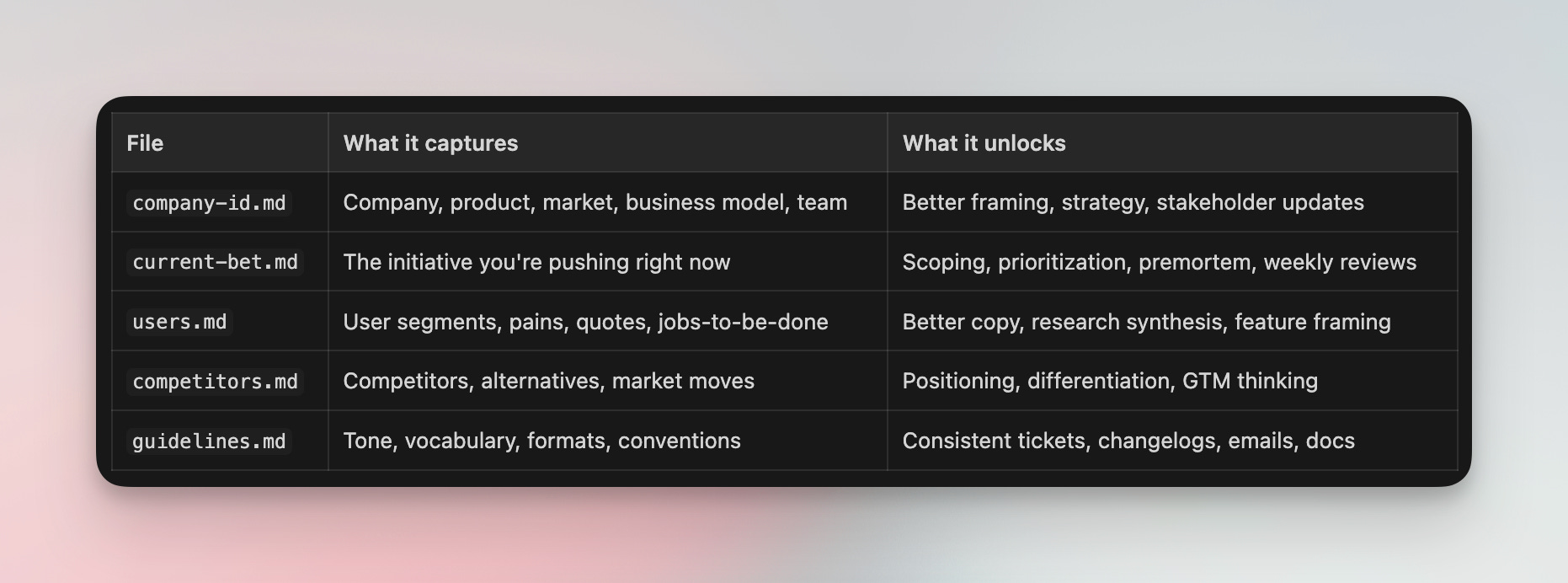
The folder looks like this:
acme-workspace/
├── company-id.md
├── current-bet.md
├── users.md
├── competitors.md
└── guidelines.md
Below, I use a fictional company called Acme, a B2B AI copilot for support teams, to show what each file looks like in practice.
1/ Company ID (company-id.md)
Think of it like the identity card of your company. Do not stuff it with too much context. Focus on information that can help prioritize what’s important, and that change slowly. You should probably update this once per quarter (or even less).
# company-id.md — Acme (excerpt)

## Company Snapshot
- B2B SaaS, Series A, 45 people, SF + remote
- "AI copilot for support teams" — auto-drafts replies, routes tickets, flags escalations

## Product Overview
- Core: reply drafting (GPT-4 based), smart routing, sentiment detection
- Strength: integrates with Zendesk, Intercom, Freshdesk in < 1 day
- Gap: no voice channel support yet, analytics dashboard is shallow

## ICP and Buying Context
- Buyer: VP Support / Head of CX at mid-market SaaS (200-2000 employees)
- User: Tier-1 support agents handling 40+ tickets/day
- Why they buy: agent burnout, inconsistent reply quality, slow onboarding
- Why they don't: "we already have macros," security review takes 3 months

## Strategy
- Company's OKR: ...
- Team's OKR: ...
- Important success metrics: ...
2/ Current Bet (current-bet.md)
The most useful file in practice. This is the one that makes the biggest difference in day-to-day AI conversations. It contains the strategic information you would use to pitch an important track to a colleague. It captures your strategy, the main surface areas, decisions, and assumptions you want to validate.
You should probably create one of this per “big rock”.
# current-bet.md — Acme (excerpt)

## Core Insight
Enterprise deals stall because security teams block AI access to customer data.
Our current architecture requires full ticket access. Competitors are shipping
"data-minimized" modes. We're losing deals we should win.

## Why Now
- Lost 3 enterprise deals in Q4 to security objections
- Competitor X launched "privacy mode" in January
- Our SOC2 Type II just completed — we have the compliance foundation

## Current Status
- Privacy-mode API spec: done
- Agent-side UX for redacted view: in progress (ships week of March 31)
- Security whitepaper for buyers: not started

## Risks & Assumptions to validate
- Redacted mode may degrade reply quality by 15-20% — no real data yet
- Engineering capacity: 2 of 4 engineers pulled to reliability work until April
I refresh this every 2 weeks. When it goes stale, almost every AI conversation gets worse.
3/ Users, Competitors, Guidelines
The other 3 files follow the same principle: structured, concise, opinionated.
users.md: Personas, pain points, jobs-to-be-done, and real quotes from interviews. The quotes matter more than the structure. AI outputs get noticeably better when they can reuse actual user language instead of inventing generic empathy.competitors.md: Competitors, alternatives, pricing anchors, market shifts. This one is perfect for Deep Research, I usually start with the competitive analysis prompt from AI Bites #1 to generate a first draft, then trim it down to what actually matters for decisions.guidelines.md: Writing tone, ticket format, changelog conventions, vocabulary to use and avoid.
Each of these files has 5-8 sections. The interviewer prompt below generates all of them, so I won’t repeat the full outlines here. You can tap on the button to see the full outlines or read the prompt below.
What NOT to put in your workspace
Do not add meeting transcripts, full research reports, raw data exports, or anything longer than 3 pages. These files are context, not archives. If a file is too long, AI either ignores the important parts or gets confused. Keep it short and opinionated.
Note: do not aim for perfection on day one. A workspace that is 30% complete already beats a blank chat.
🎙️ Create the 5 files by talking
This is my favorite part. You do not need to sit down and “write documentation.” You can just answer questions, and generate them.
I use AI as an interviewer, and dictate my answers (I use Monologue, but there is plenty of other ones). I talk, and AI structures it, spots gaps, and drafts the files.
Here’s how I use it:
1️⃣ Open a new chat in Cursor, Claude Code / Cowork or Codex, and paste the interviewer prompt below
2️⃣ Answer out loud using dictation. I dump context fast, typos and all
3️⃣ Paste any useful material you already have: notes, decks, tickets, docs, meeting transcripts
4️⃣ Review the draft files, fix what feels wrong, and save them in your workspace
It usually takes me around 15 minutes. Here is the prompt I would use 👇
You are my product workspace interviewer.

Your job is to help me build 5 markdown files that will become the memory of my AI Product Workspace:
- company-id.md
- current-bet.md
- users.md
- competitors.md
- guidelines.md

How you should work:
- First, show me the proposed outline of all 5 files
- Then interview me one file at a time
- Ask 3 to 5 focused questions per file
- Accept messy dictated answers
- After each file, summarize what you understood and tell me what still feels unclear, contradictory, or weak
- If I say "skip", leave [TO COMPLETE] markers and move on

Handling pasted material:
- I may paste documents, notes, decks, transcripts, or links at any point during the interview
- When I do, scan the material for relevant information and integrate it into the current file
- Tell me what you extracted and what you ignored, so I can correct course
- Do not stop the interview to summarize the entire document — just absorb and continue

Important behavior:
- Do not ask everything at once
- Do not write polished consultant prose
- Use my words when possible
- If a section sounds vague, challenge me and ask a sharper follow-up
- If something matters but I forgot it, point out the gap

[...] Tap the button for the full promptEnrich with Deep Research & existing files
After the interview, some sections will still be thin. That is normal. The point of the first pass is to capture what is already in your head.
Then I do a second pass for external knowledge:
1️⃣ Start a deep research on your company, and some of the competitors using the prompts shared in AI Bites #1. Then share the results with your agent, and ask which insights it would extract to complete the files. Review the changes, then ask it to update them.
2️⃣ Share presentations, transcripts and other files that contain useful strategic info with your agent. Ask which insights it would extract to complete the files. Review the changes, then ask it to update them.
🔄 Keeping it alive
The workspace is useful only if it stays close to reality. What usually happens after a week: you create good files once, it’s super useful, then decisions move on, research piles up, and the AI quietly starts using stale assumptions.
Where automation helps
Here’s how I think about the automation ladder, from simplest to most hands-off.
Level 1: Manual with AI assist (start here)
After a meeting or decision, paste the transcript or notes into your agent, along with the update prompt below. Review the suggested edits. Apply them yourself. This already cuts the update work from 20 minutes to 5.
Level 2: Recurring reviews with Claude Cowork / Codex
Set up a recurring review that scans your connected sources thanks to MCPs, meeting transcripts, decision logs, shared docs, even the codebase, and proposes workspace updates on a schedule. You still approve, but you don’t need to remember to run the prompt. The workspace stays fresh without willpower.
Level 3: Automated diffs with Claude Code or Codex
Take accepted updates and turn them into actual markdown diffs or pull requests against your workspace folder. If you version your workspace in git (I do), this gives you a history of how your product context evolved over time. Surprisingly useful when onboarding someone or reviewing past decisions.
Level 1: Manual update loop
After I finish a task, an important meeting, a new customer insight, or a strategy decision, I always talk with my agent, and end with a question:
1️⃣ “Which decisions and lessons did we discuss that should be documented in this folder? Let me review the changes. ”, then apply the adequate changes. If like me, you use snippets, you can map a shortcut to an elaborated version of this prompt 👇
Which decisions and lessons did we discuss that should be documented in this folder?
Which files would you update? Let me review the changes.

File update frequency (use this to calibrate what deserves an update):
- current-bet.md: changes often — status, scope, risks, shipped items. Update aggressively.
- users.md: changes when new research or quotes arrive. Update when evidence shifts.
- competitors.md: changes when competitors move or market context shifts. Update rarely.
- company-id.md: changes when something structural shifts (ICP, pricing, team). Almost never.
- guidelines.md: changes when conventions evolve. Almost never.

For each proposed update, show:
- file name
- section name
- why this section should change
- current content (quote it)
- proposed replacement or addition

Also tell me:
- what assumptions now look stale across files
- what contradictions appeared between files
- what evidence is still missing

If nothing important changed, say so clearly and explain why.
Do not rewrite entire files. Only suggest precise, targeted edits.
🪦 Bonus: Premortem
This is my favorite use of the workspace because it compounds the value of the whole folder.
Imagine that your current bet initiative failed, then work backward to understand why. I use AI as a facilitator to challenge my first answers and help me see what I missed.
So instead of a one-shot “give me 10 risks” prompt, I prefer an interactive one.
You are facilitating a premortem exercise based on Gary Klein's method.

First, read these files to understand the context:
- company-id.md
- current-bet.md
- users.md
- competitors.md

Your role is not to do the thinking for me. Your role is to help me think deeper.

Process:
1. Start by briefly summarizing the current bet and the success criteria you infer
2. Ask me 5 focused questions before generating any failure reasons
3. Wait for my answers
4. Generate 7 to 10 plausible reasons this initiative failed 6 months from now
5. Ask me which ones feel real, which ones feel overstated, and what is missing
6. Challenge weak assumptions, missing evidence, and optimistic interpretations
7. Refine the list

For each final failure reason, assess:
- likelihood: high / medium / low
- impact: high / medium / low
- current mitigation: yes / partial / no
- evidence: what in the workspace supports this concern

Then identify the top 3 risks that are both important and under-mitigated.

For each of the top 3, provide:
- why it matters
- what signal would tell us it is becoming real
- one action we could take this week
- one question we still need to answer

Rules:
- Be concrete
- Use the workspace, not generic startup advice
- Push back when my answers are vague
- Spot gaps between what we say we believe and what the files actually show

Output format:
- Short summary of the bet
- Ranked risk table
- Top 3 risks with actions and open questions
- Blind spots or contradictions that deserve follow-up
—
If you set up this workspace, I promise every prompt from AI Bites past editions will work better, the competitive analysis, the ticket writer, the MCP workflows, the documentation pipeline.
Thank you for reading this far. I hope you’ll find this useful. Setting up the workspace takes 20 minutes, and every AI interaction after that gets better. Try it.
Until next time!
Olivier
Share → Please help me promote this newsletter by sharing it with colleagues (tap the refer button) or consider liking it (tap on the 💙, it helps me a lot)!
About → Productverse is written by Olivier Courtois (15y+ in product, Fractional CPO, coach & advisor). Each “PM Snacks” features handpicked links to help you become a better product maker, and each “AI Bites” is a deep dive in AI-enabled workflows.